URLDispatcher
|
Size: 3406
Comment:
|
← Revision 12 as of 2015-08-04 15:15:51 ⇥
Size: 1197
Comment: + bug 1378350 (Need to allow multiple apps to handle the same url patterns)
|
| Deletions are marked like this. | Additions are marked like this. |
| Line 1: | Line 1: |
| == Introduction == The URL Dispatcher is a small service that can allow applications that are confined to launch other applications that are identified with a particular URL. Perhaps the most common case would be sending an http:// URL to the web browser, but other applications like music or just starting an application that is in a different sandbox is also supported. For most applications this is a useful way to get out of their application to another piece of content or user request. For Qt/QML applications access to the URL Dispatcher is provided through the Qt desktop plugin. C++ applications can use [[http://qt-project.org/doc/qt-5.0/qtgui/qdesktopservices.html#openUrl|QDesktopServices.openURL()]] method. QML applications can use [[http://qt-project.org/doc/qt-5.0/qtqml/qml-qt.html#openUrlExternally-method|Qt.openUrlExternally(string)]] method. Both are valid and the backend is transparent. For other applications they can use the Platform API or liburl-dispatcher directly depending on their needs. |
|
| Line 9: | Line 3: |
| == Supported URLs == | == User Documentation == |
| Line 11: | Line 5: |
| === Base URLS === | Documentation on using URL Dispatcher as an application developer is now available on the developer website: |
| Line 13: | Line 7: |
| There are a few URLs that are supported internally in the URL dispatcher. | [[https://developer.ubuntu.com/en/start/platform/guides/url-dispatcher-guide/]] |
| Line 15: | Line 9: |
| || '''URL''' || '''Description''' || || application:///$(app_id).desktop || The application URL can be used to start an application with a known [[https://wiki.ubuntu.com/AppStore/Interfaces/ApplicationId|Application ID]]. For applications that install their desktop file in /usr/share/applications the application ID should just be the name of the desktop file. || || appid://$(pkg)/$(app)/$(version) || Allows for launching an application using an application ID. Also provides for wild cards. The $(app) can be {{{first-listed}}}, {{{last-listed-app}}} or {{{only-listed-app}}} to select the appropriate applicaiton using the click manifest. Also the $(version) can be {{{current-user-version}}} to select the version in the manifest || |
== URLs with multiple handlers == |
| Line 19: | Line 11: |
| === Application URLs === | (bug Bug:1378350) |
| Line 21: | Line 13: |
| Applications can register to be opened when a URL is activated by adding a URL definition to their Click manifest. For this a small JSON file needs to be added along side the desktop file in the "hooks" section of the file. A simple manifest could look like this: | {{attachment:multiple-apps.png}} |
| Line 23: | Line 15: |
| {{{ { "name": "My App", "version": "1.2.3", "hooks": { "foo": { "desktop": "foo.desktop", "urls": "foo.url-dispatcher" } } } }}} |
Whenever the URL dispatcher is called on to open an address that multiple apps have registered for, it should open a “Use App” dialog, with a centered grid of labelled buttons with the icon for each applicable app, followed by a “Cancel” button. |
| Line 36: | Line 17: |
| Which would then point to another JSON file in your click package that defines which URLs you are expecting to recieve. A simple version of that file could look like: | == Unsupported URLs == |
| Line 38: | Line 19: |
| {{{ [ { "protocol": "foo", "domain-suffix": "bar.com" } ] }}} |
(bug Bug:1370008) |
| Line 47: | Line 21: |
| This would mean that the application in "foo.desktop" would be launched anyone someone requested a URL with the pattern "foo://*.bar.com". The {{{domain-suffix}}} field can be left out if you'd like to recieve all requests for a given protocol. The URL dispatcher definition is an array, so as many protocol/suffixes that you wish to recieve for that application may be added. | {{attachment:unrecognized-address.png}} |
| Line 49: | Line 23: |
| === Temporarily Hardcoded URLs === For legacy reasons we've hardcoded some URLs into the dispatcher: || '''URL''' || '''App ID''' || '''Description''' || || file:///home/*/Music/* || music-app || Opens music in the Music player || || file:///home/*/Videos/* || mediaplayer-app || Opens video content in the media player || |
Whenever the URL dispatcher is called on to open an address of a protocol that it does not understand (`url-dispatcher-bad-url`), it should open an alert with the title “Unrecognized Address”, text of the form ‘Ubuntu can’t open addresses of type “{protocol:}”.’, and an “OK” button. To prevent denial of UI service, however, the alert should not open if it has already opened more than three times in the past minute. |
The URL dispatcher project is hosted in Launchpad.
User Documentation
Documentation on using URL Dispatcher as an application developer is now available on the developer website:
https://developer.ubuntu.com/en/start/platform/guides/url-dispatcher-guide/
URLs with multiple handlers
(bug 1378350)
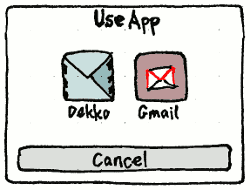
Whenever the URL dispatcher is called on to open an address that multiple apps have registered for, it should open a “Use App” dialog, with a centered grid of labelled buttons with the icon for each applicable app, followed by a “Cancel” button.
Unsupported URLs
(bug 1370008)
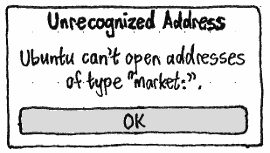
Whenever the URL dispatcher is called on to open an address of a protocol that it does not understand (url-dispatcher-bad-url), it should open an alert with the title “Unrecognized Address”, text of the form ‘Ubuntu can’t open addresses of type “{protocol:}”.’, and an “OK” button. To prevent denial of UI service, however, the alert should not open if it has already opened more than three times in the past minute.
URLDispatcher (last edited 2015-08-04 15:15:51 by mpt)